Ocean Gems Shark Arena
What players say
Ocean Gems Shark Arena offers an engaging multiplayer experience where you control a shark in an underwater arena. The gem collection and growth mechanics are easy to learn, and the boost feature adds strategic choices. Customization options let you personalize your shark, while map edge hazards keep gameplay tense. It is a great choice for casual gamers looking for quick, competitive fun.
How to play
Game Introduction
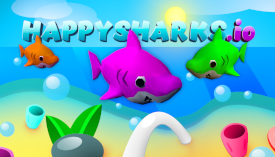
Ocean Gems Shark Arena is an online multiplayer game set in an underwater ocean environment. Players start as a small shark and compete in a free-for-all arena to collect gems, grow larger, and survive. The game combines classic arcade mechanics with real-time competition, offering a fast-paced experience where strategy and quick reflexes are key. Unique elements include map edge hazards that eliminate sharks on contact and a boost feature that allows for speed bursts at the cost of size. The goal is to become the largest shark by gathering the most gems while avoiding larger opponents and the dangerous boundaries of the arena.
How to Play
Players control their shark using mouse movement to navigate the underwater arena. The main objective is to collect gems scattered across the map to earn points and increase in size. A boost ability can be activated for a speed boost, useful for chasing smaller sharks or escaping larger ones, but it causes the player to lose gems and shrink. Players can bump into sharks of similar size without penalty, potentially knocking them into danger. A red triangle above a shark indicates it is significantly larger and can eat the player. Staying aware of the map edges and using them strategically can help players survive longer.
Game Features
Key features include real-time multiplayer competition with players from around the world. The game offers gem collection and growth mechanics, where round gems provide points and fish-shaped gems appear when a shark is eaten. A boost ability provides speed bursts but reduces size. Customization options allow players to personalize their shark with various colors and hats. Map edge hazards add a strategic element, as touching the boundary eliminates the shark. These features create a dynamic and engaging experience for players of all skill levels.
Tips for Success
To succeed in Ocean Gems Shark Arena, practice controlling your shark's movement to efficiently collect gems while avoiding larger predators. Use the boost ability sparingly, as it reduces your size and makes you more vulnerable. Stay aware of the map edges and use them to your advantage by luring opponents into danger. Observe the red triangle indicators to know when to flee or pursue. Customize your shark to stand out, but focus on survival and growth above all.