Freeway Focus Dash
Review
Freeway Focus Dash strips away unnecessary complexity to deliver a pure test of reflexes. The escalating traffic keeps each run tense, and the simple controls mean anyone can start playing immediately. The 3D visuals are clear and functional, helping players spot gaps in traffic. It is an excellent choice for anyone looking for a quick, skill-based challenge that respects their time and offers no distractions.
About
Core Gameplay Loop
At its heart, Freeway Focus Dash is about maintaining forward momentum on a multi-lane freeway. Players control a single vehicle and must navigate through a constant stream of other cars. The challenge escalates naturally: early sessions feature sparse traffic, allowing newcomers to get comfortable with the controls. As the run continues, the density of vehicles increases, demanding faster lane changes and more precise timing. There are no power-ups or shortcuts; success depends entirely on the player's ability to read the road and react.
Visual Design and Atmosphere
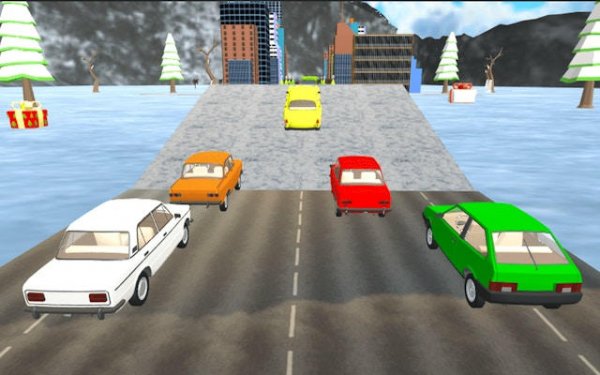
The game uses a clean 3D visual style to create an immersive driving environment. The freeway stretches into the distance, with lane markings and surrounding scenery providing a sense of speed and depth. The color palette is designed to be easy on the eyes, with clear contrast between the player's car and the traffic. This clarity is important because the game requires split-second decisions. The visual feedback is immediate: a near-miss feels tense, while a clean pass through a tight gap is satisfying. The overall atmosphere is focused and slightly intense, but never overwhelming.
Progression and Difficulty Curve
Freeway Focus Dash does not have levels or checkpoints. Instead, it offers a single, continuous run that gets harder the longer you survive. The difficulty ramps up in two ways: the number of cars on the road increases, and the patterns of traffic become less predictable. Early on, gaps between cars are large and easy to spot. Later, players must weave through clusters of vehicles moving at different speeds. This gradual increase in challenge keeps the game engaging without feeling unfair. Each run is a fresh test of concentration and reflexes.
Accessibility and Control Scheme
The controls are designed to be intuitive for a wide audience. Players can use arrow keys on a keyboard, click on-screen buttons, or tap on a touchscreen device. There are no complex combinations to learn. The primary action is moving the car left or right to change lanes. This simplicity makes the game easy to pick up for a quick session, but the increasing traffic ensures that mastering the controls takes practice. The game is free to play and does not include any in-app purchases or advertisements that interrupt gameplay, making it a straightforward experience.






Comments
Sign in to leave a note
You must be logged in before posting a review or rating.
No account? Create one
No comments yet. Be the first to comment!