Peppa Pig Coloring Fun
Review
Peppa Pig Coloring Fun does one thing and does it without friction. Pages load in a browser, tools are limited to a brush and eraser, and nothing punishes a mistake. The adjustable brush size is the most useful feature because it lets the same page serve both quick fills and detailed work. The trade-off is depth: there is no scoring, progression, or challenge, so older players may lose interest quickly. For its intended audience of children and anyone seeking a quiet creative break, the simplicity is the point.
About
What You Actually Do
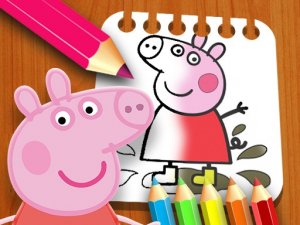
Peppa Pig Coloring Fun is a browser-based coloring activity built around scenes from Peppa's daily adventures. The loop is straightforward: pick a page from the main screen, select a color from the palette at the bottom, then click and hold on the page to fill areas. Moving your mouse or finger spreads the color, so you control exactly where paint lands. There is no timer, no score, and no fail state. The entire session is about filling a page with colors you choose.
Tools That Shape Your Artwork
Two tools do most of the work. The brush size slider lets you switch between a wide brush for large regions like skies or backgrounds and a narrow brush for small details such as facial features or clothing patterns. The eraser removes unwanted color when you overshoot an area. You can swap colors and brush sizes at any moment, which means a single page can be reworked as many times as you like before you settle on a final look.
Who This Is Built For
The game targets children and anyone who wants low-pressure creative play. Because it runs in a browser on desktops, tablets, and phones, there is nothing to install and no account to create. The absence of ads and external links keeps the experience contained. Parents of younger children can sit alongside and suggest color combinations or demonstrate the brush and eraser tools, turning a solo activity into a shared one.
Getting Better Results
Start with a page that appeals to you, then block in the largest areas first using the wide brush. Switch to the smaller brush for edges and fine details. If color spills outside a line, the eraser fixes it without resetting the page. Experimenting with unusual color combinations costs nothing, since there are no right or wrong choices and no way to lose progress.
Compatibility
FAQ
Comments
Sign in to leave a note
You must be logged in before posting a review or rating.
No comments yet. Be the first to comment!



Editorial Notes